mirror of
https://github.com/kubesphere/website.git
synced 2025-12-26 08:32:55 +00:00

250 lines
8.4 KiB
Markdown
250 lines
8.4 KiB
Markdown
---
|
||
title: '使用 KubeSphere DevOps 搭建自动化测试系统'
|
||
tag: 'KubeSphere,Kubernetes'
|
||
createTime: '2020-04-29'
|
||
author: 'Shaowen Chen'
|
||
snapshot: 'https://pek3b.qingstor.com/kubesphere-docs/png/20200428175258.png'
|
||
---
|
||
|
||
## 测试分层
|
||
|
||
测试的目的是为了验证预期的功能,发现潜在的缺陷。测试增强了交付合格产品的信心,也给敏捷迭代带来了可能。可以说,测试决定了产品的开发进度。
|
||
|
||
网络模型有七层的 OSI 、四层的 TCP,而开发模式有 MTV、MVC、MVP、MVVM 等。高内聚、低耦合,划分职责、分模块、分层。然后结构化、标准化,技术逐步走向成熟。
|
||
|
||
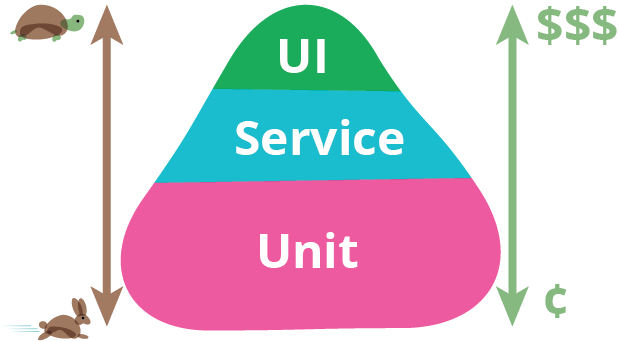
测试也分为,UI 测试、API 测试、单元测试。测试并不是一项新技术,更多是产出与成本的一种平衡。
|
||
|
||
|
||
|
||
如上图,是一个测试金字塔。越往上,需要的成本越高,对环境要求越高,执行时间越长,维护越麻烦,但更贴近终端用户的场景。在 《Google软件测试之道》中,按照谷歌的经验,各层测试用例比例是 70:20:10,也就是 70% 的单元测试,20% 的 API 测试,10% 的 UI 测试。
|
||
|
||
本篇主要讲的是如何在 KubeSphere 平台上使用 **KubeSphere DevOps 系统** 运行自动化测试。
|
||
|
||
## 什么是 KubeSphere DevOps
|
||
|
||
KubeSphere 针对容器与 Kubernetes 的应用场景,基于 Jenkins 提供了一站式 DevOps 系统,包括丰富的 CI/CD 流水线构建与插件管理功能,还提供 Binary-to-Image(B2I)、Source-to-Image(S2I),为流水线、S2I、B2I 提供代码依赖缓存支持,以及代码质量管理与流水线日志等功能。
|
||
|
||
KubeSphere 内置的 DevOps 系统将应用的开发和自动发布与容器平台进行了很好的结合,还支持对接第三方的私有镜像仓库和代码仓库形成完善的私有场景下的 CI/CD,提供了端到端的用户体验。
|
||
|
||
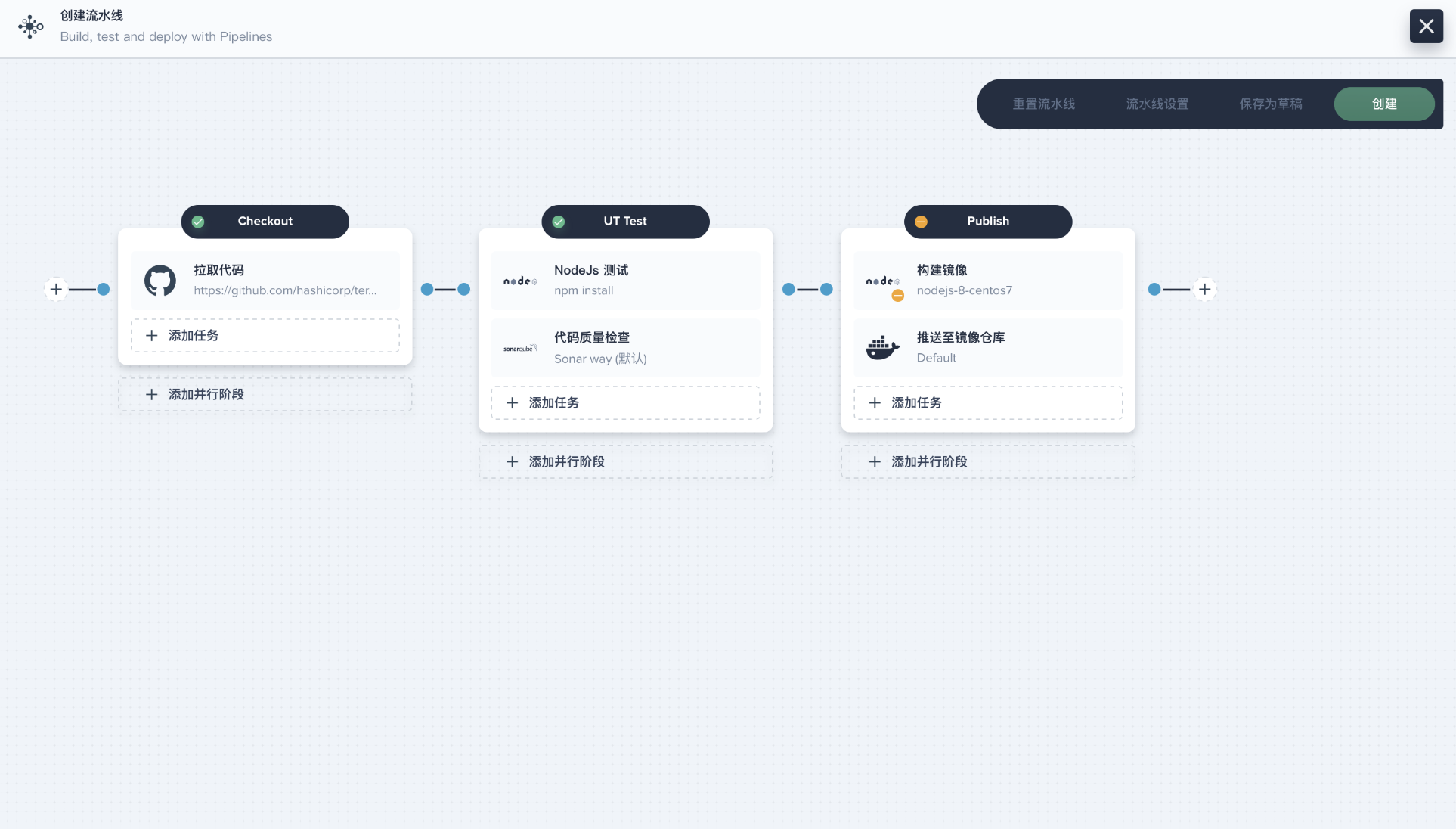
但是,很少有用户知道,KubeSphere DevOps 还可以用来搭建自动化测试系统,为自动化的**单元测试、API 测试和 UI 测试**带来极大的便利性,提高测试人员的工作效率。
|
||
|
||
|
||
|
||
## 单元测试
|
||
|
||
单元测试的运行频率非常高,每次提交代码都应该触发一次。单元测试的依赖少,通常只需要一个容器运行环境即可。
|
||
|
||
下面是一个使用 golang:latest 跑单元测试的例子。
|
||
|
||
```
|
||
pipeline {
|
||
agent {
|
||
node {
|
||
label 'go'
|
||
}
|
||
}
|
||
stages {
|
||
stage('testing') {
|
||
steps {
|
||
container('go') {
|
||
sh '''
|
||
git clone https://github.com/etcd-io/etcd.git
|
||
cd etcd
|
||
make test
|
||
'''
|
||
}
|
||
|
||
}
|
||
}
|
||
}
|
||
}
|
||
```
|
||
|
||
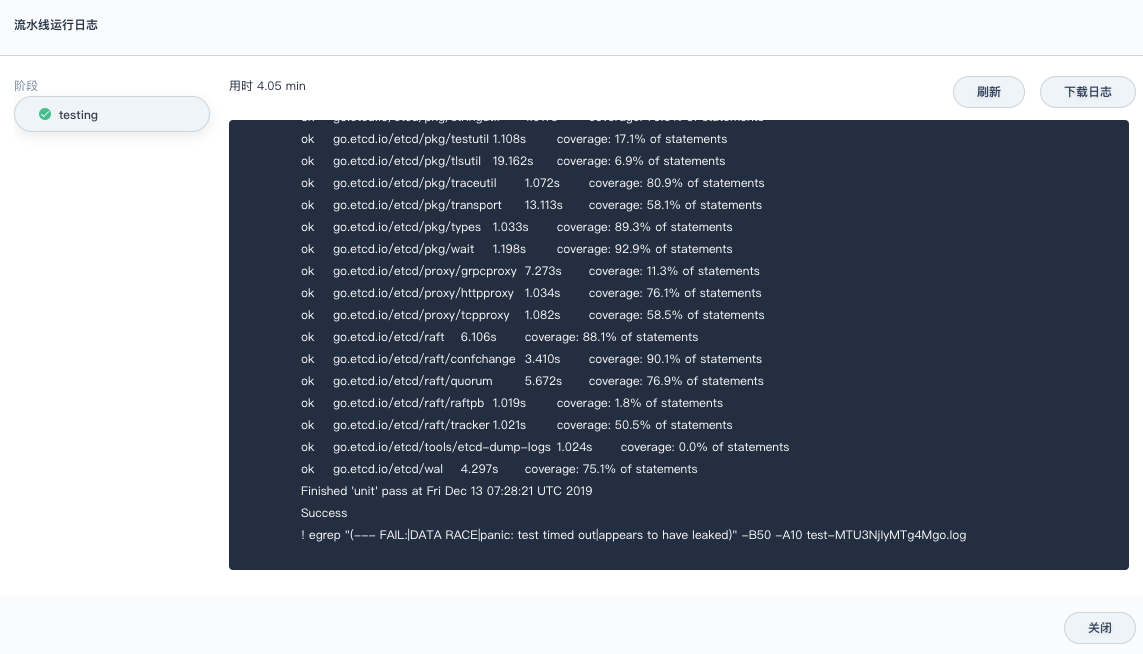
执行日志:
|
||
|
||
|
||
|
||
针对其他语言、框架,单元测试通过安装一些包、Mock 相关服务,也能够便捷地运行在 Kubernetes 上。更多可以挖掘的是写单元测试的技巧,而不是运行时和单元测试方案。
|
||
|
||
## API 测试
|
||
|
||
如果团队的自动化测试刚起步,API 自动化测试是非常好的切入点。
|
||
|
||
单元测试主要由研发负责写。在快速迭代的过程中,有经验的研发也不会忘记写单元测试。重构、变更越快,测试不会成为负担,反而更重要。没有写单元测试,只能说其不被重视。推动一件不被执行者重视、管理者很难看到收益的事情是非常难的。
|
||
|
||
而 UI 自动化测试常常又被人工测试替代。同时,维护 UI 自动化测试成本较高,在快速迭代的过程中,不应该过多地进行 UI 自动化测试。
|
||
|
||
API 测试的优势在于,在前后端分离的架构下,API 相关的文档和资料相对完善,团队成员对 API 相对熟悉,有利于进行测试。
|
||
|
||
下面是一个使用 Postman 进行 API 自动化测试的例子:
|
||
|
||
```
|
||
pipeline {
|
||
agent {
|
||
kubernetes {
|
||
label 'apitest'
|
||
yaml '''apiVersion: v1
|
||
kind: Pod
|
||
spec:
|
||
containers:
|
||
- name: newman
|
||
image: postman/newman_alpine33
|
||
command: [\'cat\']
|
||
tty: true
|
||
volumeMounts:
|
||
- name: dockersock
|
||
mountPath: /var/run/docker.sock
|
||
- name: dockerbin
|
||
mountPath: /usr/bin/docker
|
||
volumes:
|
||
- name: dockersock
|
||
hostPath:
|
||
path: /var/run/docker.sock
|
||
- name: dockerbin
|
||
hostPath:
|
||
path: /usr/bin/docker
|
||
'''
|
||
defaultContainer 'newman'
|
||
}
|
||
}
|
||
|
||
parameters {
|
||
string(name: 'HOST', defaultValue: '10.10.10.10', description: '')
|
||
string(name: 'PORT', defaultValue: '8000', description: '')
|
||
string(name: 'USERNAME', defaultValue: 'admin', description: '')
|
||
string(name: 'PASSWORD', defaultValue: 'password', description: '')
|
||
|
||
}
|
||
|
||
stages {
|
||
stage('testing') {
|
||
steps {
|
||
sh '''
|
||
apk add --no-cache bash git openssh
|
||
git clone https://yourdomain.com/ns/ks-api-test.git
|
||
|
||
cd ks-api-test
|
||
|
||
sed -i "s/__HOST__/$HOST/g" postman_environment.json
|
||
sed -i "s/__PORT__/$PORT/g" postman_environment.json
|
||
sed -i "s/__USERNAME__/$USERNAME/g" postman_environment.json
|
||
sed -i "s/__PASSWORD__/$PASSWORD/g" postman_environment.json
|
||
|
||
npm install -g newman-reporter-htmlextra
|
||
newman run iam/postman_collection.json -e postman_environment.json -r htmlextra
|
||
'''
|
||
}
|
||
}
|
||
}
|
||
post {
|
||
always {
|
||
archiveArtifacts 'ks-api-test/newman/*'
|
||
}
|
||
}
|
||
}
|
||
```
|
||
|
||
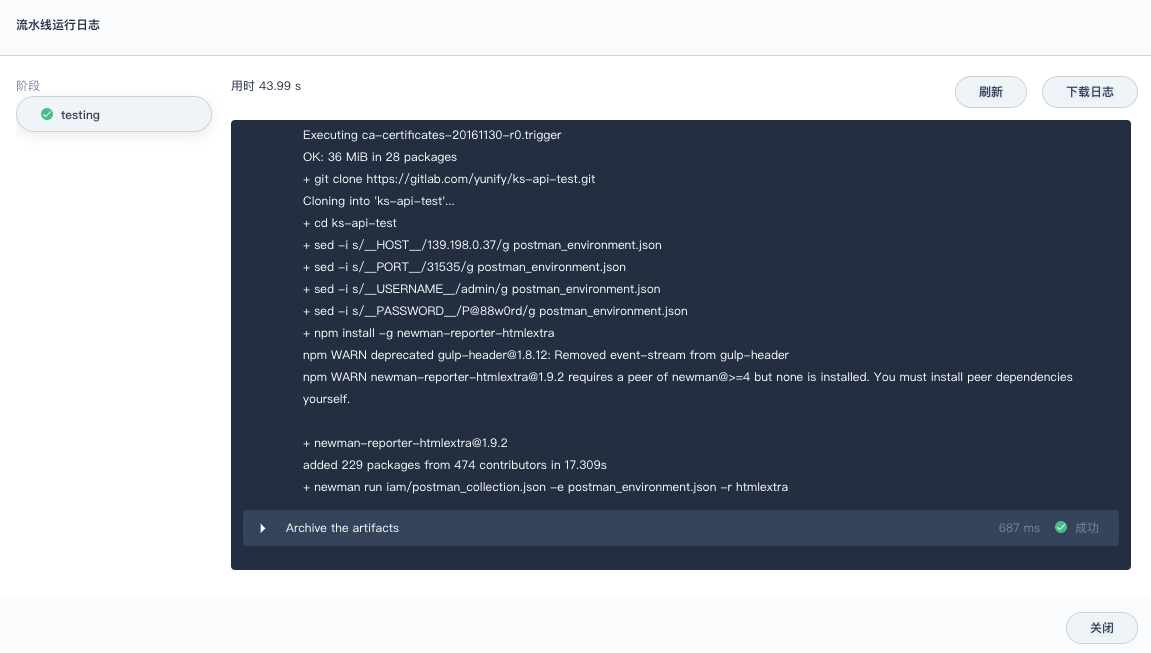
执行后的归档:
|
||
|
||
|
||
|
||
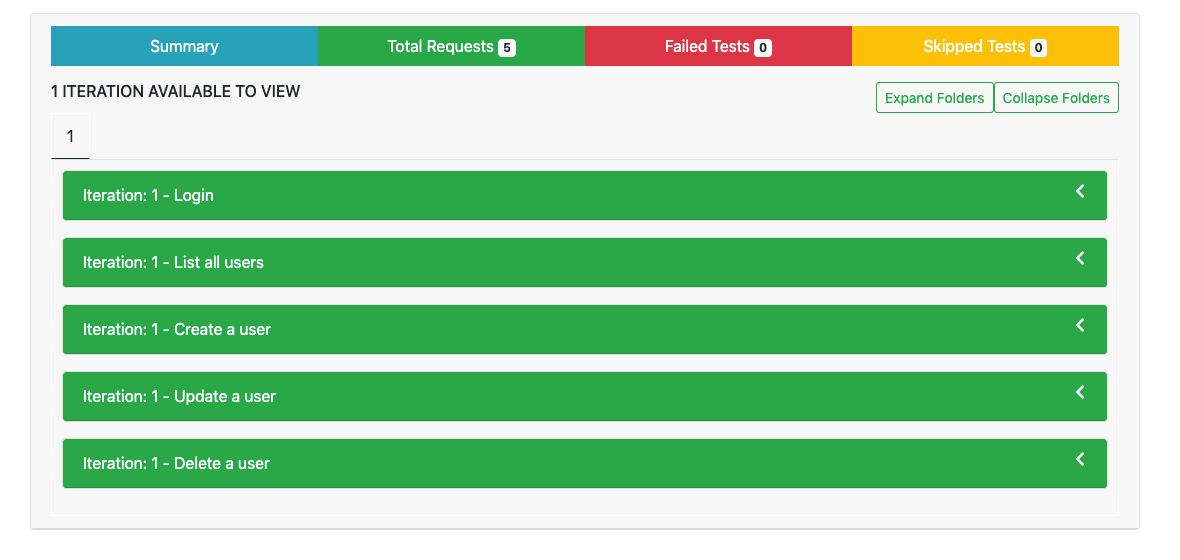
下载归档的构件,解压后查看测试报告:
|
||
|
||
|
||
|
||
API 自动化测试的框架很容易实现,实现几点功能即可:
|
||
|
||
- 接口请求
|
||
- 响应断言
|
||
- 请求编排
|
||
- 生成报告
|
||
|
||
但一定要根据团队的 API 测试、交付习惯选择合适的方案。可以自己开发,也可以使用现有的工具。上面选择的是 Postman + Newman 的方案,原因是团队普遍都使用 Postman 进行 API 测试。
|
||
|
||
剩下的就是如何组织大家进行测试,可以分别提交文件到一个共同的仓库,也可以使用付费版 Postman 共享数据集中测试。
|
||
|
||
## UI 测试
|
||
|
||
UI 自动化测试的成本高有几个方面:
|
||
|
||
- 测试用例难维护。前端样式变化、产品逻辑变化。
|
||
- 很难提供稳定的运行环境。各种超时、脏数据会导致失败率很高。
|
||
|
||
这里的 UI 自动化测试,采用的是我熟悉的 Robotframework 框架,使用关键字进行自动化测试。
|
||
|
||
下面是一个使用 Robotframework 进行 UI 自动化测试的例子:
|
||
|
||
```
|
||
pipeline {
|
||
agent {
|
||
kubernetes {
|
||
label 'robotframework'
|
||
yaml '''apiVersion: v1
|
||
kind: Pod
|
||
spec:
|
||
containers:
|
||
- name: robotframework
|
||
image: shaowenchen/docker-robotframework:latest
|
||
tty: true
|
||
volumeMounts:
|
||
- name: dockersock
|
||
mountPath: /var/run/docker.sock
|
||
- name: dockerbin
|
||
mountPath: /usr/bin/docker
|
||
volumes:
|
||
- name: dockersock
|
||
hostPath:
|
||
path: /var/run/docker.sock
|
||
- name: dockerbin
|
||
hostPath:
|
||
path: /usr/bin/docker
|
||
'''
|
||
defaultContainer 'robotframework'
|
||
}
|
||
}
|
||
|
||
parameters {
|
||
string(name: 'HOST', defaultValue: '10.10.10.10', description: '')
|
||
string(name: 'PORT', defaultValue: '8080', description: '')
|
||
string(name: 'USERNAME', defaultValue: 'admin', description: '')
|
||
string(name: 'PASSWORD', defaultValue: 'password', description: '')
|
||
}
|
||
|
||
stages {
|
||
stage('testing') {
|
||
steps {
|
||
sh '''
|
||
curl -s -L https://raw.githubusercontent.com/shaowenchen/scripts/master/kubesphere/preinstall.sh | bash
|
||
git clone https://yourdomain.com/ns/ks-ui-test.git
|
||
|
||
cd ks-ui-test
|
||
|
||
sed -i "s/__USERNAME__/$USERNAME/g" tests/common.robot
|
||
sed -i "s/__PASSWORD__/$PASSWORD/g" tests/common.robot
|
||
|
||
echo "\nTestEnv http://$HOST:$PORT" >> tests/api.robot
|
||
echo "\nTestEnv http://$HOST:$PORT" >> tests/devops.robot
|
||
./start.sh'''
|
||
}
|
||
}
|
||
}
|
||
|
||
post {
|
||
always {
|
||
sh 'tar cvf report-$BUILD_NUMBER.tar ks-ui-test/tests/report'
|
||
archiveArtifacts '*.tar'
|
||
}
|
||
}
|
||
}
|
||
```
|
||
|
||
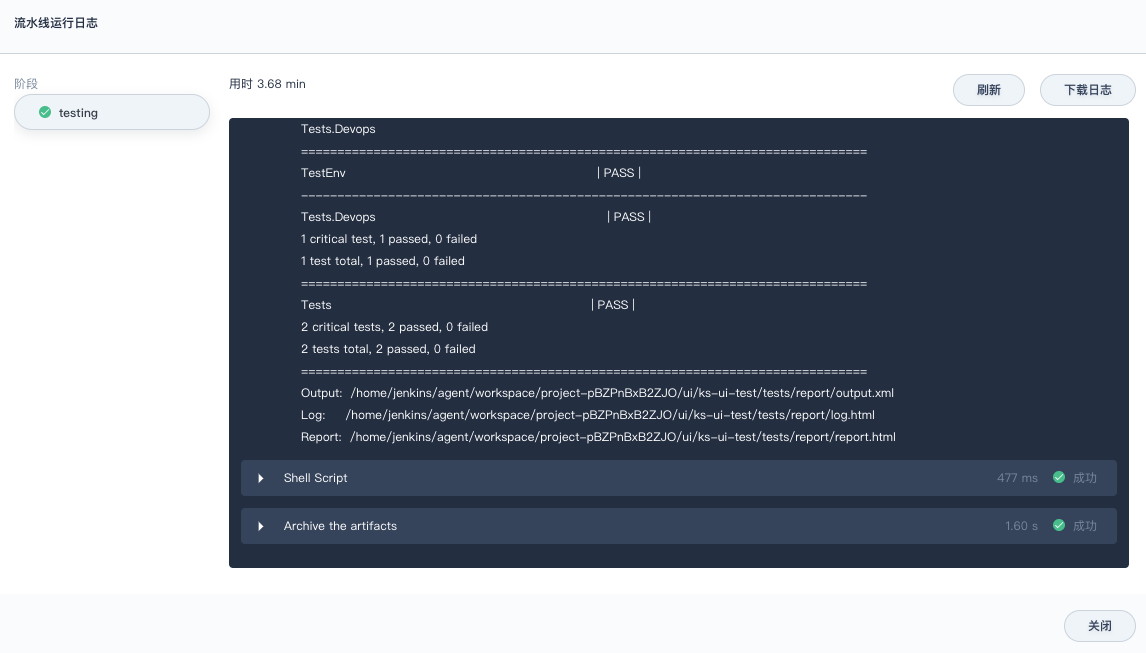
执行日志:
|
||
|
||
|
||
|
||
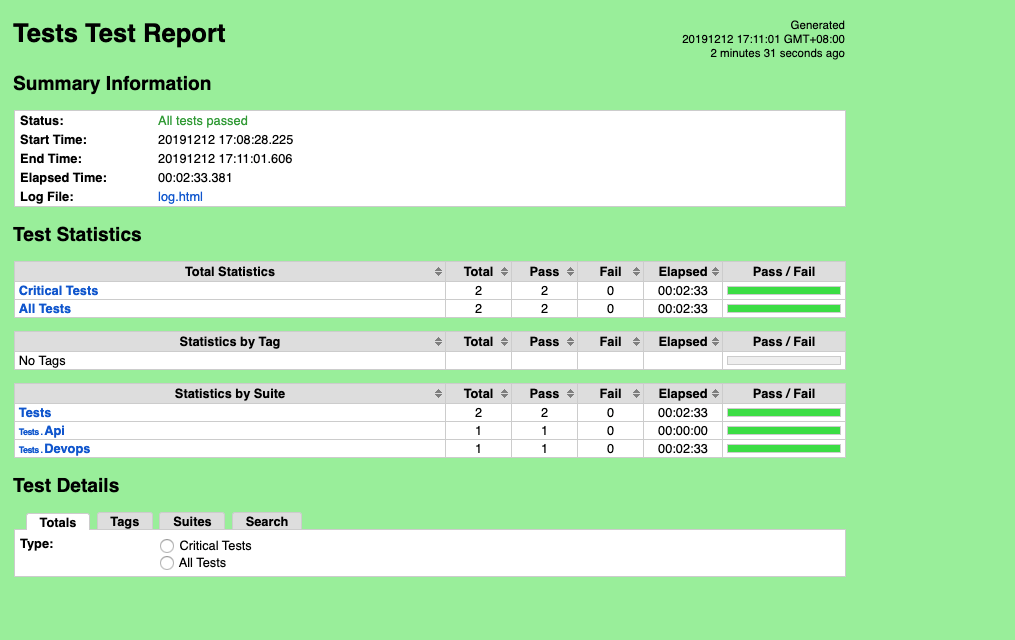
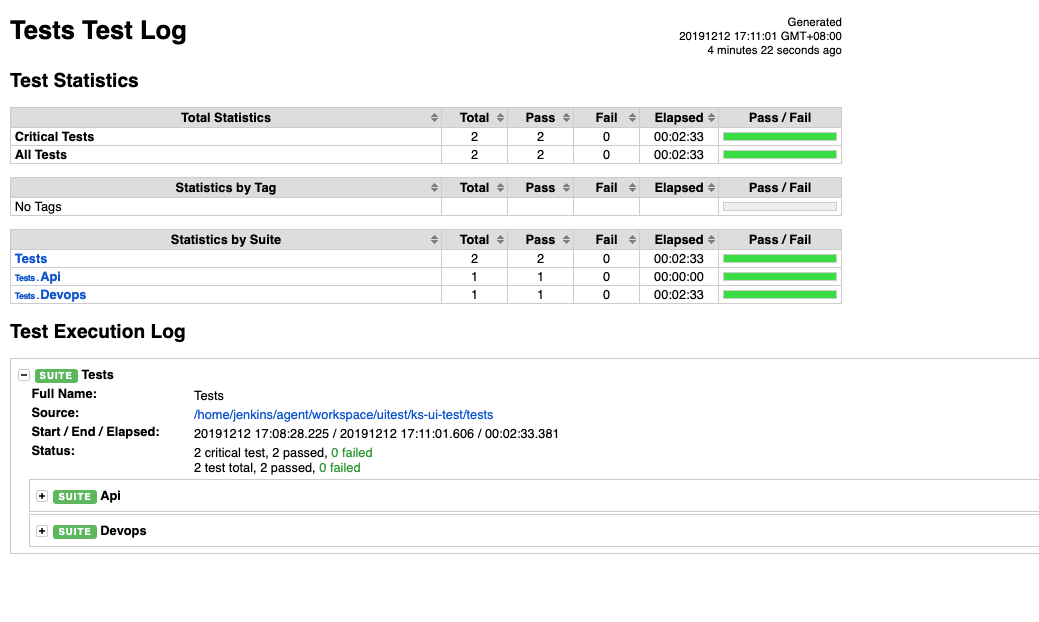
下载归档的构件,解压后查看测试报告:
|
||
|
||
|
||
|
||
|